Containerization vs Virtualization: Key Differences Every Developer Should Know
Understand why containers are lighter, faster, and ideal for modern apps — and when virtualization still makes sense.

Introduction
A long time ago, developers would spend endless nights writing code, racing against deadlines just to deliver that one crucial feature. And then came the nightmare:
“It worked on my machine, but in production… nothing worked!”
The dreaded error codes — XY10165X and its friends — haunted them like ghosts.
In the quest for cleaner, bug-proof systems, we decoupled applications into smaller services. But even then, another monster appeared: two services needing the same library but different versions. Debugging that mess felt as dreadful as being stuck inside a whale’s mouth in a dream.
And just when we thought the pain couldn’t get worse — scaling. What if one service suddenly faces a flood of requests? Manually fixing and scaling it? A nightmare of its own.
But here’s the good news. For all these problems, a modern solution exists. And that’s where our journey begins. Let’s dive in slowly, deeply, and from multiple angles — so we too can use this solution to make our developer journey a little more fearless.
What is Containerization?

Containerization is the process of packaging an application’s code along with all its dependencies, libraries, and configurations into a single, self-contained unit called a “container.”
The benefit? Your app runs consistently and reliably across any environment—be it a developer’s laptop, an on-prem server, or the cloud—because the container neatly isolates the app from the underlying system.
Sounds heavy, right? Let’s slow it down.
Think about when we start building any application. What do we actually need first? The latest bug-proof language version, obviously. Then the libraries and packages our app will depend on. And of course, a few other essentials.
Now picture this — you’re contributing to an open-source project. You find some repo, say XYZ, clone it to your local machine, install all the dependencies, and start contributing. Great.
But here’s the issue: those dependencies now live inside your local system. Tomorrow, if you try to build your own project, you might keep running into annoying errors because of conflicts with those pre-existing dependencies. Why? Because your local file system is shared across everything on your machine.
That’s exactly the problem some smart folks decided to solve. Their idea?
“Take this black box, put your app and all its dependencies inside it, and just run one command. Wherever you go, just run it — no worries.”
This black box doesn’t mess with your system. It creates its own isolated file system, but still leverages your machine’s resources. That’s why it’s both fast and reliable.
This “black box” is what we call a container. You can run as many containers as you want on your local machine, without ever worrying about dependency clashes. And that famous developer excuse — “But it worked on my machine!” — containers basically kill it.
The process of creating these containers? That’s containerization.
Got a doubt? 🤔
You might be thinking — wait, didn’t we already have something like this? Maybe virtualization, hypervisors, or something along those lines?
What is Virtualization?

Virtualization is a technology that uses software to create simulated versions of physical computing resources — like servers, storage, and networks — so that multiple virtual environments can run on a single physical system.
This helps in using resources more efficiently, cuts down costs, and boosts flexibility. Basically, one physical server is divided into multiple virtual machines (VMs), and each VM can run its own operating system and applications independently.
Now, let’s try to break it down step by step, just like we did with containerization — super easy, with a real-life analogy.
You must have heard at some point that an X person rented a machine from Y company to run their server. Now think about it — there must be tons of people who need different kinds of machines with different configurations to run their servers, right?
But will a company actually keep separate physical machines for every single demand? That would be a total loss! Maybe one type of machine is in demand today, but after a few days, it becomes useless — boom, wasted cost.
To solve this problem, companies keep a few really powerful high-end machines. And whenever a user request comes in, instead of giving them a brand-new physical machine, they create a “dummy machine” (a virtual one) inside their existing high-end machine, with the exact configuration the user asked for.
To the user, it feels like they’ve got their own separate machine — because this dummy setup has its own private stuff like network, storage, and hardware (borrowed from the host machine), plus its own kernel, operating system, etc. So, it doesn’t even feel like a dummy — it feels like a real, dedicated machine.
And that dummy machine is what we call a Virtual Machine (VM).
The software that makes this possible — taking user configurations and spinning up these virtual machines — is called a Hypervisor.
And the whole process? That’s Virtualization.
VM vs Container Comparison
| Aspect | Virtual Machines (VMs) | Containers |
| Isolation level | Hardware-level — each VM has its own kernel & OS | OS-level — share host kernel; isolated user-space |
| Startup time | Seconds → minutes | Milliseconds → seconds |
| Resource overhead | High — full OS per VM | Low — no guest OS per container |
| Density per host | Lower | Higher |
| Typical use-cases | Multi-OS testing, strict isolation | Microservices, CI/CD, cloud-native apps |
| Examples / tech | VMware, KVM, Hyper-V | Docker, containerd, Podman |
So I hope it’s clear now why we shouldn’t jump to virtualization just to run microservices or simply to isolate an app — unless we really need it. It’s heavy.
Why? Because every virtual machine gets its own dedicated chunk of hardware resources (CPU, memory, storage, etc.), and it doesn’t interfere with others. That’s great when you actually need hardware-level isolation.
But think about it — do we really need that much setup for most day-to-day use cases? Not really. If the main goal is just to separate file systems so that app dependencies don’t clash, then why bring hardware into the mix at all? Containers do the same job in a much simpler and faster way.
The Real Difference
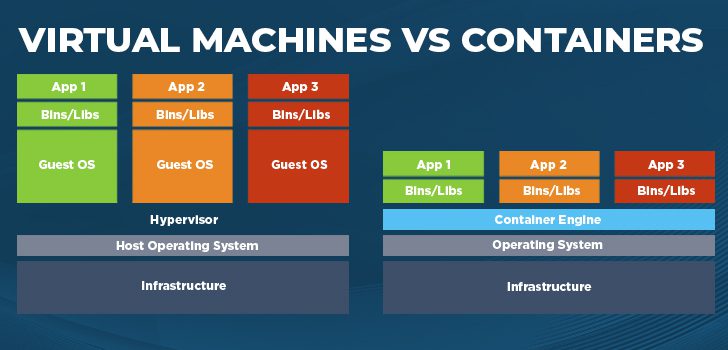
Virtualization → hardware-level isolation (each VM behaves like its own machine).
Containerization → lightweight, file-system-level isolation (apps share the same OS kernel but still stay independent).
This simplicity is what makes containers both portable and reliable.
And yeah — these days, there are tons of tools available in the market to create containers. In one of the upcoming blogs, we’ll definitely talk about this and even see how to apply it practically using some of the popular tools.
Until then, keep sipping your coffee ☕ and keep reading CoffeeByte’s technical articles.
Take care, see you soon!